Everything Nochi can do
A tiny companion,
a full set of tools.
An AI brain — all living in your notch. Here's every single thing Nochi can do.
A little friend that does its own thing.
Nochi is an animated character that lives in your MacBook's notch. It walks around, skateboards, cooks, sips boba, does pilates, reads, sleeps — over 30 unique animations that cycle throughout your day. Open your laptop in the morning and Nochi's having coffee. Grind through homework and Nochi's reading a book. Put on music and Nochi starts bobbing its head. There's no feeding. No health bar. No notifications guilt-tripping you into opening the app. Nochi just exists up there, doing its thing while you do yours.
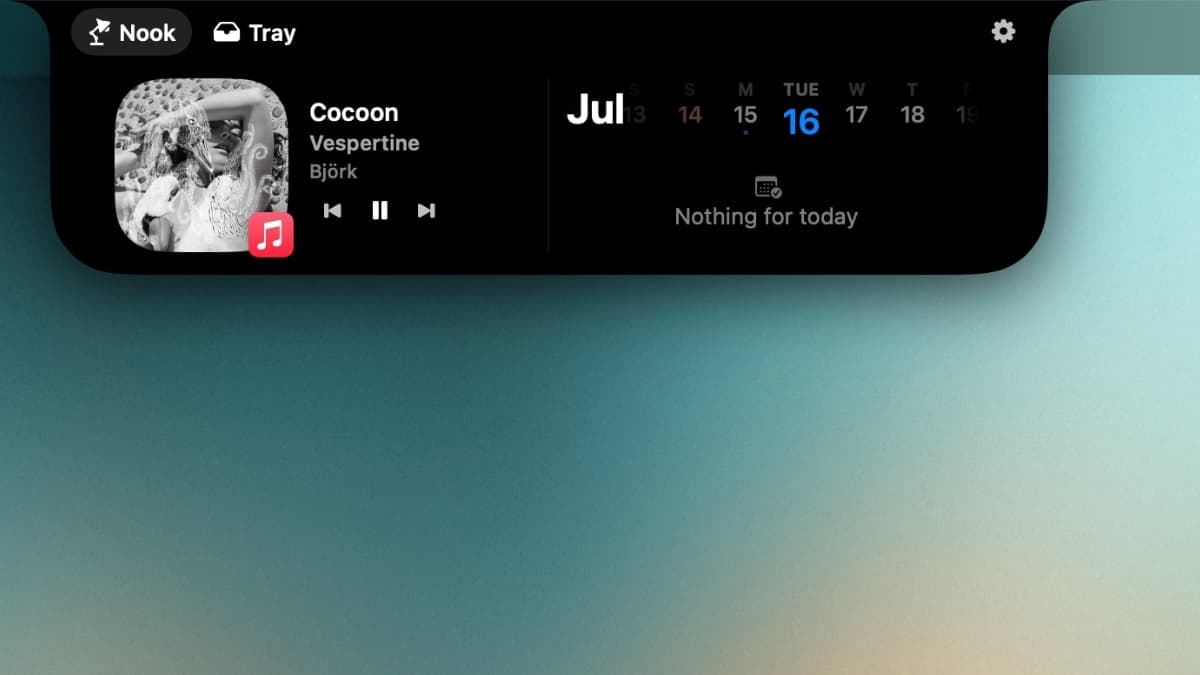
Your notch is now a music player.
Control your music without leaving what you're doing. Play, pause, skip — all from the notch. Album art shows up with color-matched effects that blend into Nochi's world, so every song looks different up there. No more reaching for Spotify or hunting for the media keys.
Your next meeting, right where you can see it.
Upcoming events and deadlines surface in the notch automatically. You always know what's coming next without opening Calendar or checking your phone. It's the kind of thing you didn't know you needed until you stop missing things.
Ask Nochi anything. Get an answer instantly.
Need a quick answer? Ask Nochi. It responds right from the notch — no opening a browser, no switching tabs, no waiting for a page to load. Quick math, a definition, a brainstorm, a random question at 2am. Nochi's right there. This isn't a chatbot buried in a separate app. It lives where you're already looking.
Camera check in 2 seconds.
Click the notch, see yourself. That's it. Before a Zoom call, before a FaceTime, before you walk into a meeting with coffee on your shirt. Nochi gives you a tiny mirror whenever you need one.
Know your power at a glance.
Clean battery indicators that live in the notch. You can see exactly how much juice your MacBook has without hovering over the menu bar or opening system settings. No more surprise shutdowns in the middle of a lecture.
Drag it in. Drop it out.
Nochi's notch doubles as a file shelf. Drag a file up into the notch to hold onto it, then drop it wherever you need it later. It makes moving files between apps and folders way faster — especially when you're juggling multiple windows and don't want to lose track of something.
HUDs that don't look terrible.
The default macOS volume and brightness popups are ugly and they block your screen. Nochi replaces them with clean sliders that blend right into the notch. Same function, way better design.
Smooth, warm, and built to feel native.
Nochi uses the Peach Fuzz palette — soft, warm tones that look good on every MacBook. Animations are smooth, transitions are fluid, and nothing feels clunky or out of place. The whole experience is designed to feel like it shipped with your Mac, not like something you bolted on.
Ready to meet your new notch buddy?
Everything above, in one tiny app. Download Nochi and put your notch to work.
Get Nochi for Mac